

Heym wasn’t open
Reminders appear only while Heym is open on that computer.- In a browser: a Heym tab has to be open. It can sit in the background.
- In the Mac app: a Heym window has to be open. Closing the window keeps Heym in the Dock and the menu bar, but reminders wait until you open the window again.
The reminder shows a warning triangle
Open the task or habit and look at its reminder. If Heym can’t deliver it, the reminder shows a small warning triangle. Point at the triangle to see why:
Which reminders need a date or a start time is on Reminders.
Completed tasks don’t send reminders. A habit stays quiet on a day you’ve already done it (with a target such as 3 times a week, once you reach the target), on days you mark as skipped or failed, and while it’s archived or read-only because it’s over your Free plan limit. See Reminders for habits.
Notifications are blocked in your browser
Click your name at the top of the sidebar, then Settings → Notifications. If your browser blocks Heym, both reminder switches are off and gray, with this note: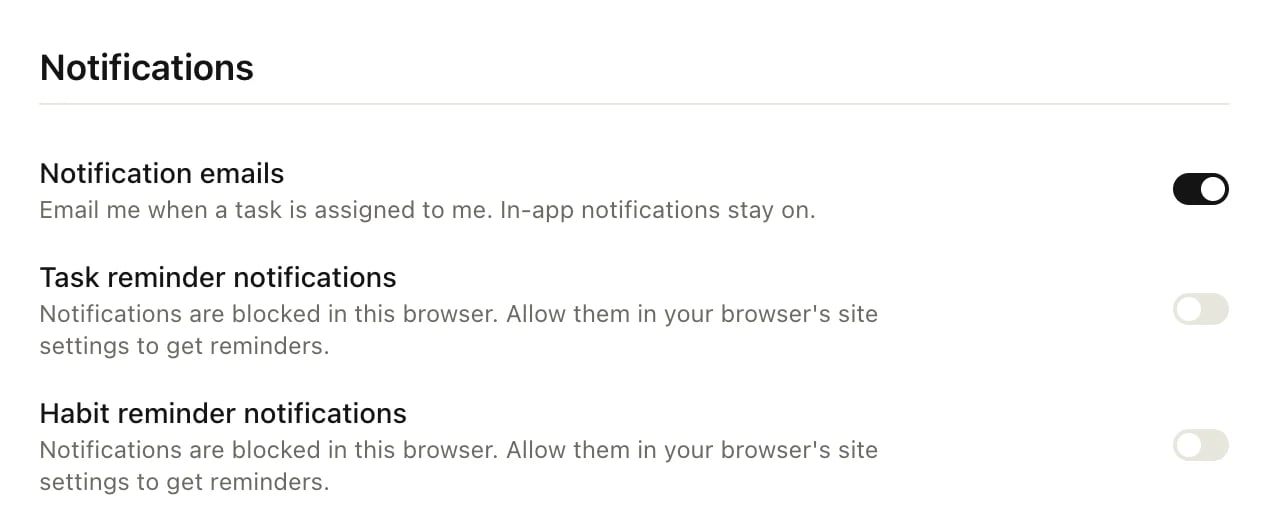
- Open your browser’s site settings for Heym. In most browsers, click the icon at the left end of the address bar.
- Set Notifications to allow, then reload Heym.
- Back in Settings → Notifications, check that both switches are on.
- On a Mac: open System Settings → Notifications, choose your browser and turn on Allow notifications.
- On Windows: open Settings → System → Notifications and check that notifications are on for your browser.
Your browser never asked about notifications
In a browser, Heym can show notifications only after you allow them. If both switches are on but you closed your browser’s question without answering, or it never appeared, turn Task reminder notifications off and on again. Your browser asks whether Heym can show notifications: allow it.The reminder switches are off
In Settings → Notifications, make sure Task reminder notifications and Habit reminder notifications are on. Both switches apply only to the browser or Mac app where you set them, so check them on each computer you use.The Mac app can’t show notifications
The Mac app asks macOS, not a browser. Open System Settings → Notifications, choose Heym and turn on Allow notifications.Focus or Do Not Disturb is on
Focus or Do Not Disturb on your computer holds notifications back. Turn it off, or allow Heym (or your browser) in its settings.Still not working?
Write to support@heym.app and tell us which task or habit it was, its date, start time and reminder, whether you use the Mac app or a browser (and which one), and whether Heym was open at that moment.Related
Reminders
Every reminder option, and how they’re delivered.
The Mac app
The menu bar icon, Launch at Login and updates.
Habits
Schedules, targets and habit reminders.
Contact support
What to put in your message.