

Best for Heym: People who want to plan their life around goals, with life areas, habits and tasks linked from the start
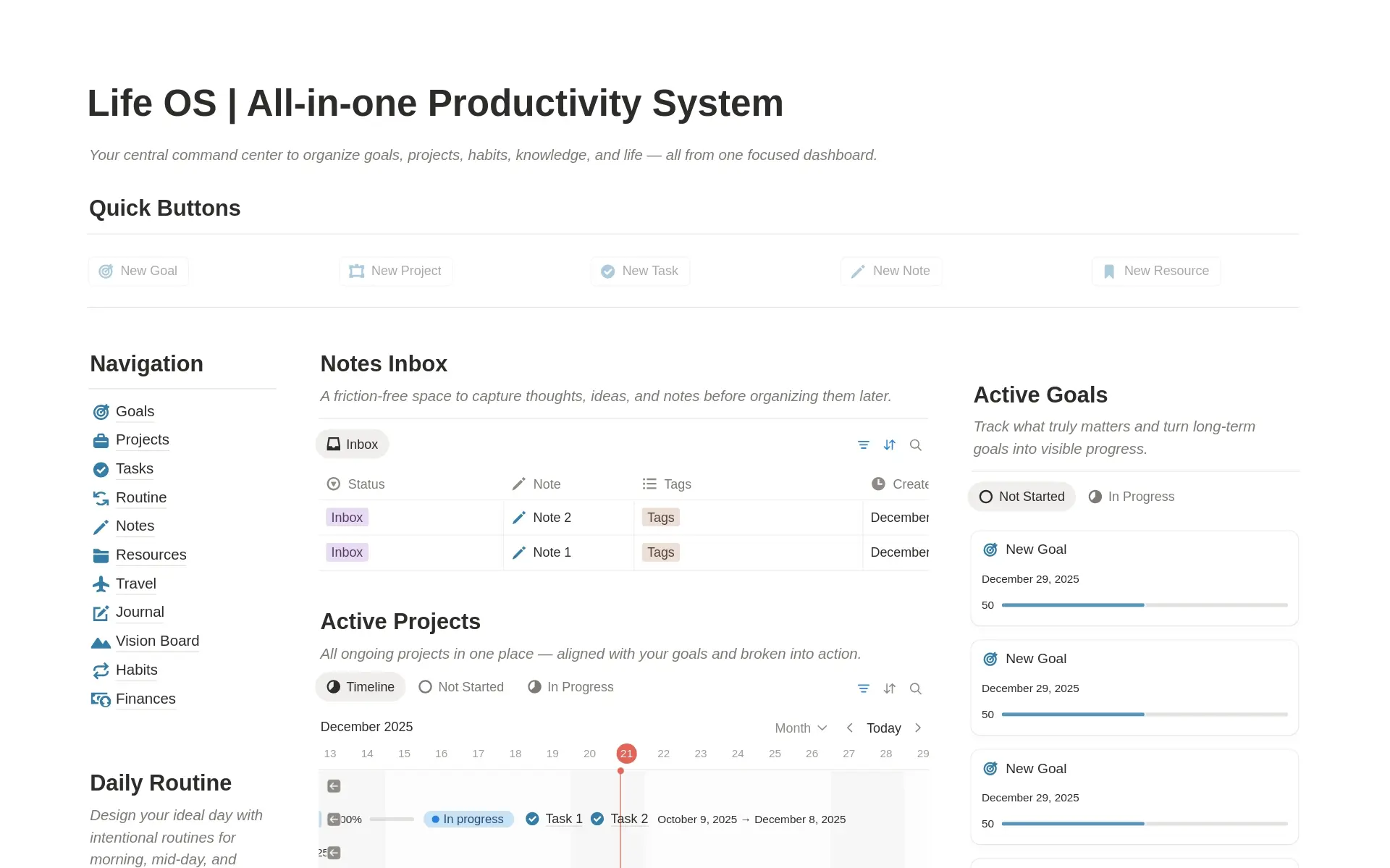

Best for Notion: People who want to build their own system from pages and databases, right next to their docs
When Notion is the right choice
Don't switch just because Heym is built for life planning. Here's when Notion actually fits you better, and when Heym does.
Pick Notion
Notion wins when you want to build your own system and keep your docs right next to it
- You want a flexible workspace with complete freedom: pages, databases and templates, and you decide the structure
- You need custom fields, views and relations on every task
- Your docs, wiki and team knowledge live in Notion and should stay there
- You want one workspace for everything, with AI agents and integrations built in, rather than a tool made for one job
- You'd rather start from a template: Notion's gallery has thousands of planners to copy and adapt
Pick Heym
Heym wins when you want to plan your life around goals without building the system first
- You want an opinionated, purpose-built life planner that works out of the box: life areas hold goals, and goals hold the projects, habits and tasks that move them forward
- Goals track their own progress through tasks, sub-goals or a number you log
- Habits keep their streaks, and each one is linked to a goal
- Tasks, habits and Google Calendar events share one calendar, with two-way sync
- Pro is €30 a year, or €119 once for Lifetime. Notion Plus is US$120 a year per member.
Notion vs Heym for life planning: goals, projects, habits and tasks
In Notion, this would be a page you design yourself. In Heym, every life area comes ready, with room for the life you want there, like this one for Health.
That turns into a goal with a date and a progress bar. No rollups or formulas: the bar moves as you finish tasks or log a number.
A goal breaks down into projects. In Notion, tying a project to a goal is a relation you set up yourself. In Heym, every project shows the life area and goal it serves, with milestones and its own progress bar.
A Notion habit tracker is a template, usually a table with a checkbox for each day. In Heym, each habit keeps its own streak and sits under the goal it serves.
Now your tasks have a reason. A project says where a task lives. Heym also shows the goal behind it, so you know what comes first.
 Change cover
Health
Stay fit enough to say yes to anything. Strong knees at 60, energy left after work, and a race on the calendar every year.




Run my first half-marathon
Race day is Sunday, July 26. Goal pace is 5:40 per km, so the long runs build to 18 km by early July.
Keep one easy run between hard sessions. If a long run slips, strength training moves to the next rest day.
LOVE LOVE this so much. I used to spend days inside Notion, tinkering around with the perfect setup. In the end I got nothing important done. Heym's opinionated system gives me peace of mind and I can actually focus on the stuff that move me closer to my goals.

Heym and Notion: side-by-side comparison
Planning your day
Task list
Inbox, Today and Upcoming
Inbox, Today and Upcoming, ready when you sign up
My Tasks collects tasks assigned to you. Every other list is a database view you build.
Quick add
Type details into the task title
Dates, times, priorities, labels, goals and reminders
Type @ and a date to mention it on a page. Due dates, priorities and tags go into database properties.
Calendar
Your tasks laid out by day and hour
Tasks and habits on a 4-day, week or month calendar, next to your Google Calendar events
A calendar view for any database, plus Notion Calendar, a separate app for Google, iCloud and Outlook calendars
Time blocking
A start time and a length on the calendar
Yes, on every plan
Yes, by dragging database items to a time in Notion Calendar
Projects
Related tasks, grouped in sections
Yes, with a board view, milestones and notes, linked to a goal
Yes, as databases with the views and properties you set up
Repeating tasks
Yes, including repeat after done
Through a database template that adds a new page daily, weekly, monthly or yearly
Subtasks
Not yet. A task's description can hold a checklist.
Sub-items, once you turn them on for a database
Priorities
High, medium and low
A property you add yourself
Reminders
Browser and Mac notifications while Heym is open
Yes, by push and email. Repeating reminders aren't supported yet.
Pomodoro timer
Focus on one task for a set time
Yes, on Pro
No focus timer
Planning your life
Goals with progress
A bar that fills toward a target
Yes, measured by tasks, sub-goals or a number you log
No goals feature. You can build one with databases and a progress-bar property.
Life areas
Sport & Health, Work & Career and so on
Yes, each with the life you want there
Only as pages you set up or a template
Habits
Yes, tick off or count, with streaks, linked to a goal
No habit tracker. Community templates use a table with a checkbox per day.
Notes
Headings, lists, to-dos, images and files, linked to a goal or life area
Notion's core: pages with tables, databases, toggles, embeds and much more
Working with others
Sharing
Share a life area, goal or project as editor or viewer. Both people need Pro.
Yes, whole workspaces or single pages. The free plan allows 10 guests.
Assign tasks
Yes, in anything you share
Yes, with a Person property
Integrations
Google Calendar
An API, Notion Calendar and Mail, and imports from Asana, Trello, Evernote and Confluence
AI assistant
No AI features
Notion AI and agents on Business. Free and Plus get a trial.
Apps
Web and Mac
Yes
Yes
Windows
No app. Use Heym in your browser.
Yes
iPhone and iPad
Coming soon
Yes
Android
Planned
Yes
Price
Pro, billed yearly
Heym
€30
a year for Pro
- €5 a month, billed monthly
- €119 once, for Lifetime
- Free plan available
Notion
US$120
a year per member for Plus
- US$12 a month, billed monthly
- Business with Notion AI: US$240 a year
- Free plan with unlimited pages for one person
Checked against notion.com, Notion's pricing page and its help center on 8 November 2026. Prices are Notion's US prices per member. A red cross in the Notion column means we couldn't find it on Notion's own pages, which doesn't prove it's missing. The Notion screenshot shows the Life OS template by heyismail.co. See something wrong? Email support@heym.app.
How to switch from Notion to Heym
01
Write your life vision
Pick the parts of your life that matter and write down where you want each one to go.
02
Set your goals
Turn each vision into goals with a date and a way to measure them.
03
Bring over what's still open
Heym doesn't import from Notion, so this is a fresh start. Add the projects that serve a goal, and keep Notion for your docs if you like.
Frequently asked questions
Can Heym replace Notion?
For planning, yes. Heym has tasks, projects, a calendar with time blocking, goals, habits and notes, all linked to each other. For the rest of what Notion does, no: Heym has no databases you design, no team wiki and no AI. Many people keep their docs in Notion and plan in Heym.
Why not just use a Notion template?
You can, and some are very good. A template is still a set of databases you maintain yourself: when you want to track something new, you change the formulas, views and relations. Notion's gallery lists nearly 3,000 habit-tracking templates alone. Heym gives you one structure that already works: goals measure their own progress, habits keep their streaks and tasks show the goal behind them.
Is Heym simpler than Notion?
Yes, on purpose. Heym makes the structural choices for you, so there's nothing to set up before you plan. You add a task in one line and type its date, label and priority into the title. The trade-off is flexibility: you can't add your own fields to a task the way you can in a Notion database.
Do I have to set goals to use Heym?
No. You can use Heym as a plain task list. Skip the goals step when you sign up, make Inbox or Today your start page, and hide Goals, Habits and Areas in the sidebar until you want them. Every account still starts with a set of life areas.
Does Heym have notes like Notion?
Heym has notes with a page editor: headings, lists, to-dos, quotes, code, images and files, all from a slash menu like Notion's. Each note links to the goal or life area it's about. There are no tables or databases inside a note, so Heym won't replace a Notion wiki.
Does Heym sync with my calendar?
Yes, with Google Calendar. Connect one or more Google accounts and your events show up in Heym's calendar next to your tasks and habits. You can create, move, edit and delete them right there, and the change lands in Google. Apple Calendar and Outlook aren't supported yet. Notion Calendar is a separate app that connects Google, iCloud and Outlook calendars, and you can drag Notion tasks onto a time there.
Can I share a list with my partner or team?
Yes. You can share a life area, goal or project with someone as an editor or a viewer, and assign tasks to them. Both of you need Pro. Notion is built for teams: it shares whole workspaces or single pages, and the free plan allows 10 guests. If your team already runs on Notion, keep it for that.
How much does Heym cost compared with Notion?
Heym Pro is €30 a year or €5 a month, and Lifetime is €119, paid once. The free plan has unlimited tasks, 3 goals, 3 habits and 20 notes. Notion is free for one person with unlimited pages. Plus costs US$10 per member a month billed yearly, or US$12 monthly, and Notion AI beyond a trial needs Business, at US$20 per member a month billed yearly. See the pricing page.
Can I import my tasks from Notion?
No. Heym imports only from Todoist and TickTick. Treat it as a fresh start: add the projects that still matter, link each one to a goal, and keep Notion for your docs if you like.